

Generative AI for business can turn rough notes into a clear customer reply. The harder question is whether that reply makes a promise your company can keep.
Consider a hypothetical online retailer in Bengaluru. A customer asks for a refund after the return window has closed. An AI tool drafts a polite response and promises repayment within three days.
The wording looks fine. However, no one has approved the refund or the deadline.
The problem starts when a useful writing tool becomes an unchecked source of business decisions. Before adopting one, decide what it may generate, which facts it needs, and who can approve the result.
What generative AI does
Generative AI creates text, images, sound, and code. A language model writes text using patterns learned in training and the context you give it. That context can include a prompt, past messages, or files.
A large language model reads text in small units called tokens. These can be words, parts of words, or marks such as commas. To write a reply, it picks the next token, then repeats the step. The answer can be useful even when no one has checked its facts.
For example, a model can rewrite an awkward email or suggest headings. These tasks have many valid answers. A refund depends on stricter rules: the firm’s policy, the facts of the order, and who can approve a special case.
Some AI tools link models to search tools or the firm’s records. These links can bring in facts to check. However, a chat box alone tells you little about which checks take place.
Our enterprise AI guide explains how these tools fit into a wider business process.
Why a convincing answer still needs evidence
Language models can make false claims that sound true. This problem is known as hallucination. A reply may invent a source, get a rule wrong, or mix facts in a way that misleads readers.
NIST’s Generative AI Risk Management Profile calls this problem confabulation. Therefore, check whether an answer is true as well as how well it reads.
In the retail example, the draft could get the name and order number right while inventing the refund deadline. A quick check of those first two facts would miss the harmful error.
Therefore, review the claims that affect the customer. Check the refund amount and whether the policy covers this order. If an exception is needed, confirm who approved it.
A fluent paragraph does not answer those questions on its own.
Also avoid treating a model’s claim of confidence as proof. Ask for the source and check whether it backs the claim. If the source is missing, staff should be able to pause the reply.
Give the tool current, approved sources
Retrieval-augmented generation, or RAG, adds a search step before the model writes. The system finds source material and gives it to the model to help answer the question. Google Cloud’s guide to RAG explains why the search must find sources that fit the task.
For the retailer, an approved source could be the current returns policy. The tool might find the right section and show it beside the draft. Staff could then check whether the reply matches that rule.
However, a search step does not ensure a correct answer. The tool might find an old policy, miss a special case, or write a claim that has no support. A source link helps only when it backs the claim beside it.
Give someone the job of keeping sources up to date. They should remove old policies and control who can read each file. If two versions disagree, resolve the conflict before staff use them. Our AI data readiness checks cover how to prepare.
Use only the customer information needed for the task. Before putting personal or confidential data into a service, check who can access it and how long the provider keeps it. Also confirm whether the provider may use that material to train models. For an early trial, use made-up customer records where practical.
Keep drafting separate from permission to act
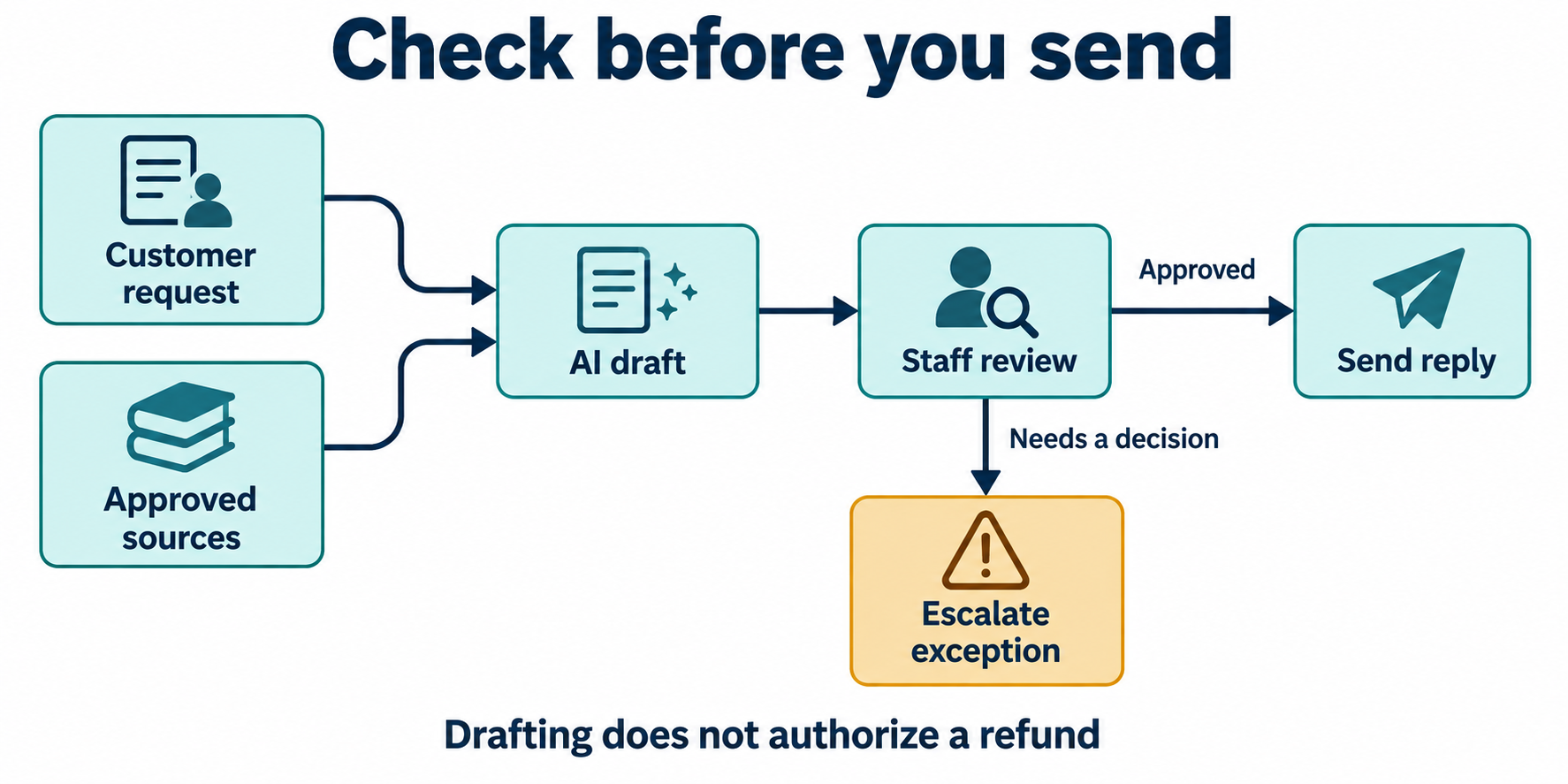
A tool that drafts a refund email may have no right to issue a refund. Make that limit clear in the design.
For the first trial, let the AI prepare a response for staff review. Do not give it automatic sending or payment access. The reviewer should see the original request, relevant order details, policy evidence, and proposed reply together.
The reviewer also needs time and the right to reject the draft. An “Approve” button offers little help if staff cannot check the sources or change the result.
Decide which requests need a manager’s review. For example, a late return should go to someone who can approve an exception. Until that person decides, the draft should leave the refund decision open.
Similarly, do not rely only on an instruction telling the model to stay within policy. Restrict available actions in the surrounding software. Record who approved an exception and what response the customer received.
These limits matter even more when generative AI links to tools that send messages or change records. For each new action, decide who can approve it and what happens if it fails.
Test generative AI on the complete task
Start with a small set of real-world tasks and a clear view of what a good reply should say. Include routine cases, missing order details, sources that disagree, and requests outside policy.
Then compare AI-assisted work with the current process. Measure the time from receiving a request to approving the reply, including corrections and referrals to a manager. Fast draft generation may save little if staff spend longer checking each answer.
Track errors by the harm they could cause. An awkward greeting and a refund promise without approval should not get the same weight. Also note when the tool correctly asks for more facts or sends the request to a person.
Agree on what the tool must pass before you review test results. For example, a trial could require staff to approve each outgoing message and block claims with no source. These checks fit this case; other tasks need their own rules.
After a policy change or model update, repeat the tests that it could affect. Keep a way to return to the old process if quality falls or the service goes down.
For a first generative AI trial, choose a task that staff can check. Give them the sources and the time to review each draft. Expand the tool’s role only when test results show it can handle the next task.

